CR Mobile App
- 4.2
- Rating
- 50.00K
- Installs
- Free
- Price

 Analysis by App-foxy
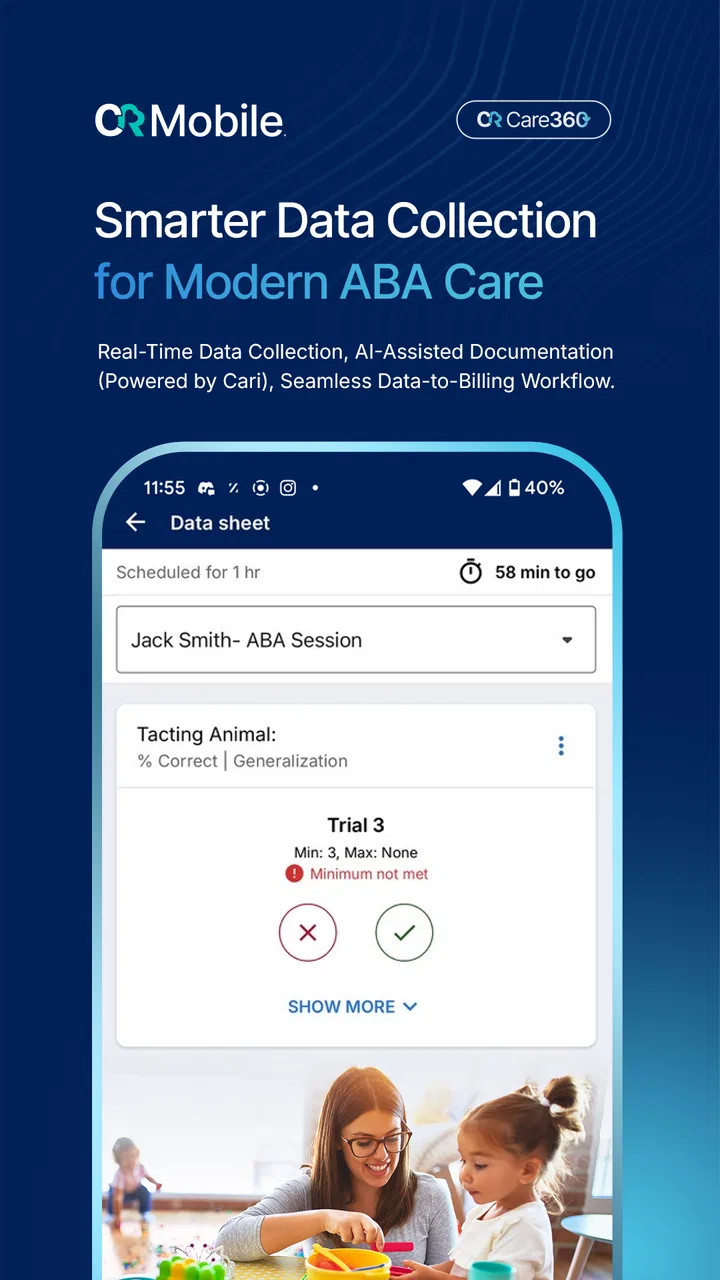
CR Mobile App is a focused medical tool for people involved in applied behavior analysis care, and my overall impression is that it works best when it is treated as part of a professional workflow rather than as a general health app. CentralReach, LLC. presents it as a way to rethink ABA care, but the practical value is more grounded: it gives users a mobile point of access to the work surrounding ABA services. That makes it potentially useful during busy days when sitting at a desktop is inconvenient, while also making its audience much narrower than the word “medical” might suggest.
I approached it as someone deciding whether a mobile care companion would genuinely earn a place in a daily routine. The answer depends heavily on your role. A clinician, technician, supervisor, or other person already working within a CentralReach-based environment may find the app relevant. Someone simply looking for self-guided behavioral advice, a symptom tracker, or a family wellness app will probably find that it is aimed at a different kind of user. Its main strength is workflow access, not broad consumer health education.
What the mobile experience is really good at
I find the mobile experience most compelling when it helps ABA work fit around real movement through the day, rather than asking every task to wait until someone is back at a desk. In this section, I’ll look at the kinds of moments where that convenience can matter and why choosing the right tasks for a phone is as important as having access in the first place.
You May Also Like

 Blood Strike: 2.5 Anniversary
Blood Strike’s Loadouts Turn Every Drop Into a Tactical Gamble
A close look at Blood Strike’s custom loadouts: how fast access to signature weapons reshapes its battle royale rhythm, rewards preparation, and narrows the gap between fights.

 Pandora - Music & Podcasts
Pandora’s Music Is Easy to Start, but Harder to Recover
Pandora’s strength is its low-effort path from a seed to a station. Its weak spot is how much confidence it asks you to place in connection, setup, and quiet recovery.

 8 Ball Pool
 Is Built on Rivalries, Rematches, and Routine
A close look at the rivalries, rematches, shared routines, and unanswered safety questions that turn a quick pool match into a persistent mobile community.

 Samsung Music
’s Quiet Strength Is Playing What You Already Own
Its reach comes less from spectacle than from dependable access to a personal library. That simplicity is both the app’s strongest retention engine and its ceiling.

 AccuWeather: Weather Radar
AccuWeather Review: A Quick, Clear Forecast for Everyday Decisions
For everyday plans, the best forecast is the one you can understand quickly. AccuWeather makes rain timing, radar, and local conditions easy to act on, with a few trade-offs.

 Hill Climb Racing
Why Hill Climb Racing Still Turns Crashes Into One More Run
A tiny car, a bumpy hill and one more upgrade: Hill Climb Racing keeps resurfacing because its simple chaos makes every near-miss feel personal.
More From Our News Desk
View All News


A practical extension for ABA work
The most convincing reason to use CR Mobile App is convenience in situations where care-related work does not happen at a desk. ABA services can involve movement between appointments, time spent in homes or community settings, and frequent transitions between direct work and documentation. A mobile application is naturally better suited to those moments than a browser window that expects a fixed workstation. Even without treating the phone as a replacement for every administrative task, having a dedicated mobile route can reduce the friction of switching contexts.
That distinction matters. I would not judge this app by the same standard as a meditation app or a general medical reference. Its purpose is connected to the operational side of ABA care, so its usefulness is likely to appear in small moments: checking what needs attention before a session, keeping work moving while away from a computer, or handling part of a professional routine without carrying a laptop. The value is less about entertainment or discovery and more about reducing unnecessary pauses.
In my experience with specialized medical apps, the best ones are not always the most feature-packed. They are the ones that fit a real sequence of tasks without demanding too much thought. CR Mobile App has the right basic idea for that kind of use. It is a purpose-built companion from CentralReach, LLC., rather than a generic note-taking tool being adapted to clinical work. That specialization gives it a clearer role, even though it also means the app will not be equally useful to everyone.
Where it can save time during a normal day
Imagine a technician moving through a day of ABA sessions. Between appointments, there may be only a short window to review the next part of the work or deal with information connected to the care routine. Opening a phone app can be more realistic than finding a quiet desk, launching a browser, and reconstructing the same context from scratch. The important benefit is not that a phone magically makes clinical work faster; it is that the mobile format can make small follow-up actions easier to fit into the day.
A supervisor may also appreciate the ability to stay connected to work while moving between locations. In that situation, the app’s worth comes from continuity. The user does not have to regard mobile access as a separate system with a completely different purpose. It can serve as a convenient companion to the broader CentralReach environment, assuming the user already belongs to that professional workflow.
One useful habit is to decide in advance which tasks are genuinely suitable for a phone. Short checks and time-sensitive actions are a natural fit. Long reviews, complicated organization, and anything requiring careful comparison may still feel more comfortable on a larger screen. This is a meaningful trade-off: the app can reduce access friction, but it does not remove the need for good judgment about where mobile work stops being efficient.
Why the medical category needs some context
CR Mobile App is listed in the Medical category, but that label should not lead a casual reader to expect diagnosis, emergency guidance, medication information, or a broad library of health content. The app belongs to a professional care setting associated with ABA. That makes the category accurate in a specialized sense, while still requiring a more careful interpretation than a typical patient-facing medical app.
For families receiving ABA services, the app may be relevant only if their care organization and role give them a reason to use it. I would not install it expecting an independent source of behavioral treatment. It is better understood as a work-oriented mobile access point. That difference is one of the most important things to understand before downloading it, because it prevents the common mistake of judging a specialized tool as though it were intended for every household.
Small workflow decisions make a big difference
A non-obvious advantage of a mobile companion is that it can change when users choose to complete routine work. Instead of postponing every small action until returning to a computer, a professional may be able to deal with appropriate items closer to the moment they arise. That can make the end of a long day feel less overloaded. It also encourages a cleaner separation between tasks that need immediate attention and tasks that are better handled later in a full desktop environment.
I would use the app with a simple rule: use mobile access for momentum, not for rushing. A phone is convenient, but convenience can tempt people to complete important work while distracted, walking, or between competing responsibilities. In ABA care, accuracy and context matter more than saving a few seconds. The app is at its best when it supports a disciplined routine rather than becoming an excuse to squeeze professional documentation into unsafe or unsuitable moments.
Another practical tip is to check the application before a busy day rather than discovering its limits during a session. Confirm that your account works, that your organization expects mobile use, and that you understand which parts of your routine belong on the phone. This preparation is especially worthwhile for new users because a specialized application can feel confusing if approached without the surrounding CentralReach workflow.
Performance expectations and the current release
The current version is 26.8.1, and the app runs on Android 9 or later. That compatibility range is useful for people using relatively established Android devices, although anyone with an older phone should check the operating system before planning around it. The application is free to install, which lowers the barrier for eligible users who want to test whether mobile access fits their workday.
Free installation should not be confused with universal access to every part of the service. A professional app can still depend on the user’s organization, account, permissions, or existing relationship with the platform. That is not a flaw unique to this product; it is simply part of how specialized care systems work. The key point is that downloading it is only one step. The real question is whether your role and workplace make the app useful.
The public response is encouraging but not definitive. CR Mobile App holds a 4.2 average from around 255 ratings, with about 85 written reviews and over 50 thousand installs. I read that as evidence of a real user base and generally positive reception, not as proof that every workflow is smooth for every professional. Medical tools often receive very different reactions depending on account setup, organizational configuration, and the exact tasks a person needs to perform.
The friction I would not ignore
The biggest limitation is scope. If you are not already connected to ABA care work through the CentralReach ecosystem, the app may offer little practical value. It is not the kind of download I would recommend simply because someone wants to learn more about behavior analysis. A general educational resource, a patient portal designed for families, or a broader health organizer may be a better choice depending on the goal.
There is also an unavoidable mobile trade-off. A phone is portable, but its smaller screen can make detailed professional work less comfortable than using a desktop interface. If your routine involves reading a large amount of information, comparing several items, or entering careful notes for a long period, mobile use may feel cramped. I see CR Mobile App as a complement to a larger workflow, not an automatic replacement for every other access method.
Another point is that convenience can create false confidence. When an app makes a professional system available from almost anywhere, users may feel pressure to remain constantly available. That is a workflow and boundary problem, not necessarily a software defect, but it matters in real life. I would set clear expectations about when mobile work is appropriate and when it should wait for a secure, focused session at a computer.
New users may also need patience while learning where the app fits. A specialized tool rarely explains an entire organization’s process by itself. If you expect a consumer-style experience with instant personal setup, you may be disappointed. The better approach is to treat the application as one piece of a structured service and learn it alongside the procedures used by your clinic, employer, or care team.
Who should choose it, and who should skip it
I would recommend CR Mobile App first to ABA professionals who already use CentralReach-related services and need a practical mobile option during the working day. Technicians who move between sessions, supervisors who need occasional access while away from a desk, and care teams trying to reduce dependence on one fixed workstation are the clearest audience. For these users, the app’s specialized nature is an advantage rather than a restriction.
It may also suit organizations that want staff to have a consistent mobile route into their existing care workflow. The important word is “existing.” The app makes more sense when there is already a process to connect it to. Before installing, I would ask a manager or care coordinator whether it is expected for your role and what tasks you are meant to perform through it. That simple check can prevent wasted time and confusion.
I would skip it if you are a general health consumer looking for a personal medical diary, a medication reminder, a symptom checker, or self-directed ABA lessons. I would also hesitate if your work does not involve CentralReach services or if nearly all of your responsibilities require a large-screen interface. In those cases, a more general app or a desktop-first system may be more suitable, even if it lacks the focused connection to ABA care.
Families should approach it with the same care. If a provider specifically asks you to use it, then it may have a clear place in your relationship with that provider. If you are browsing for help without an existing service connection, it is unlikely to be the right starting point. A family-facing resource that explains treatment, communication, and daily support in plain language would probably be more immediately useful.
How it compares with ordinary alternatives
The usual alternatives fall into two groups: general productivity apps and full desktop-based clinical systems. A notes app may be simpler and faster for personal reminders, but it will not be designed around the needs of an ABA care environment. A generic task manager can organize a day, yet it does not provide the same specialized context. Those tools are fine for personal planning, but they are not interchangeable with a professional mobile companion.
On the other hand, a desktop clinical system may offer a more comfortable workspace for detailed review and extended documentation. It can be easier to see more information at once and maintain concentration when the work is complex. CR Mobile App has the advantage when location and timing matter, while the desktop alternative has the advantage when depth and screen space matter. I would not frame that as a simple winner-and-loser comparison; the strongest setup may use each format for the tasks it handles best.
The app also differs from broad telehealth products. A video consultation platform is built around communication between people, while CR Mobile App is tied more closely to the practical organization of ABA care. Someone choosing between them should first identify the job to be done. If the need is a scheduled conversation, a communication-focused service may be better. If the need is mobile access to an established ABA workflow, this application is more relevant.
What I would check before relying on it
Before making it part of a daily routine, I would verify three things. First, confirm that your organization supports the app for your role. Second, test it during a low-pressure period so you know how it fits with your normal work rather than learning during a time-sensitive session. Third, decide which tasks should remain on a desktop for comfort, review quality, or concentration.
I would also keep expectations realistic about the meaning of a free app. The lack of an installation charge makes experimentation easier, but it does not turn the application into a standalone medical service. Its usefulness comes from the professional environment around it. If that environment is present, the app can be a convenient extension. If it is not, the download alone will not create the missing workflow.
For anyone concerned about age suitability, the app carries an Everyone content rating. That describes the store’s content classification, not a promise that every person will find the product relevant. The more important question is professional purpose. A tool can be appropriate for a broad age audience while still being intended mainly for adults or organizations handling care-related responsibilities.
My verdict for everyday use
After weighing the convenience against the limitations, I see CR Mobile App as a sensible specialist tool with a deliberately narrow audience. It does not need to become a complete medical platform to be useful. Its strongest case is helping people involved in ABA care stay connected to their work when a computer is not close at hand. That is a modest promise, but it is also a practical one.
The app earns its place when it removes small barriers from an established routine. It is less persuasive when someone expects a self-contained health experience, a general behavior guide, or a replacement for every desktop task. The smaller screen, the dependence on an appropriate professional context, and the need for sensible boundaries all keep it from being a universal recommendation.
My final view is positive, with a clear condition: download CR Mobile App if your ABA organization or care role gives you a concrete reason to use it. In that situation, the free mobile access, broad device compatibility, and focused purpose make it worth trying. If you are outside that setting, I would choose a tool designed around your actual need rather than installing this one simply because it appears in the Medical category.
FAQs for CR Mobile App
01What is the CR Mobile App used for?
CR Mobile App is designed to give users convenient access to CR-related services and information from a mobile device. Depending on the version and organization behind it, you may be able to view account details, receive updates, manage requests, access documents, or contact support. Before downloading, check the official listing to confirm that its available features match your specific needs.
02Is CR Mobile App free to download and use?
The CR Mobile App may be available as a free download, although some services accessed through it could require an account, subscription, membership, or separate payment. Downloading the application does not necessarily mean every feature is free. We recommend reviewing the app-store description, terms of service, and any pricing information before registering or submitting payment details.
03What permissions does CR Mobile App require?
During installation or first use, CR Mobile App may request permissions such as internet access, notifications, camera access, storage, or location, depending on the services you use. Some permissions may be optional, while others could be necessary for specific functions. Review each request carefully and deny permissions that are unrelated to the features you intend to use.
04Can I use CR Mobile App without creating an account?
Access requirements depend on how CR Mobile App is provided and which tools you want to use. Some general information may be available without signing in, but personalized features, records, submissions, notifications, or support services may require an account. If registration is necessary, use accurate information and protect your password, verification codes, and other login credentials.
05Is CR Mobile App safe and compatible with my device?
CR Mobile App should be downloaded only from a trusted source, such as Google Play or the Apple App Store, where the publisher, version history, permissions, and privacy information can be reviewed. Compatibility depends on your Android or iOS version and device model. Keep your operating system updated, avoid unofficial APK files, and install updates when they become available.
Pros
- Fast access to account details and recent activity
- Convenient mobile access from almost anywhere
- Simple navigation makes common tasks easy to find
- Useful alerts can help users stay informed
- Available for both Android and iOS devices
Cons
- Some features may require a stable internet connection
- Older devices may experience slower performance
- Notifications can become distracting if left enabled
- App functionality may vary by region or account type
- Users may need extra verification when signing in

CR Mobile App
Gallery